
How Can I Register for Y999 and Fix Registration Problems?
If you’ve been trying to register for Y999 Game and keep running into issues, or you’re not even sure which Y999 website to trust, you’re not alone. There are half a dozen domains floating around with “Y999” in the name, and the registration process isn’t exactly explained well anywhere. This guide covers everything: which site to use, how to actually complete registration (step by step), what you get after signing up, and how to fix every common registration problem Pakistani players run into.

Which Y999 Site Is Actually Official? (Read This First)
Before you register anywhere, this question matters more than most guides admit.
Y999 operates its main platform at y999-gameapp.pk. That’s the actual casino and gaming lobby, the one that runs in PKR, supports Urdu, and has the full game library including Aviator, Fortune Gems, Live Baccarat, and the sportsbook. When you register and deposit, your account lives on this platform.
The other sites you’ve probably come across, places like y999gamepk.com.pk, y999app.app, y999game.bet, y999club.pk, are affiliate and guide sites. They’re built by third parties who earn a referral commission when they direct new players to the real platform. They’re not fake or dangerous, but they are not the platform itself. Think of them like travel comparison websites: they point you to the airline, but you’re not booking through them.
Why does this matter to you?
Because when you click “Register” on one of those affiliate sites, you should be redirected to the actual Y999 platform to complete your account. If any site asks you to pay money before creating an account, or asks you for your CNIC details on a form that doesn’t look like the official Y999 Game interface, stop and double-check the address bar. Your login details, payment info, and identity documents should only go into the official platform.
Quick tip:
After landing on the registration page, look at your browser’s address bar. The domain should be y999-gameapp.pk or a domain you’ve specifically verified. If it looks different and unfamiliar, close the tab.
What You Need Before You Register
Registration itself is fast, under three minutes if everything is in order. But a few things need to be ready before you start, otherwise you’ll hit a wall mid-way.
Active Pakistani mobile number:
This is non-negotiable. Y999 Game App sends a one-time password (OTP) via SMS to verify your number. Your SIM needs to be active and able to receive text messages. A lot of people try with old or borrowed SIMs and then wonder why the OTP never shows up, if your SIM can’t receive a regular SMS from a friend, it won’t receive one from Y999 either.
A real email address:
You can skip adding your email during registration, but don’t. Your email is your account recovery lifeline. If you lose your SIM card, change your number, or forget your password, without an email on file, recovering your account becomes a serious hassle. Add it the moment registration is done.
An Android phone or a desktop browser:
Y999’s main app comes as an APK for Android. iOS users don’t have a dedicated app, but the mobile browser version works on iPhone, it’s just a slightly different experience. Desktop players can use the website directly in Chrome or Firefox.
Your age:
You need to be 18 or older to register and use the platform. This is a terms of service requirement.
One thing you do not need to register your CNIC:
You’ll need it later for withdrawal verification (more on that below), but the registration form itself only needs your phone number and a password.
How to Download the Y999 APK on Android?
Since Y999 isn’t on the Google Play Store, you need to download the APK file directly. This trips a lot of people up, but it’s actually straightforward once you know the steps.
Step 1: Get the APK from a Trusted Source
Go to the official Y999 website (y999-gameapp.pk) or a verified affiliate site and find their download link. Do not download the APK from random Telegram groups, Facebook posts, or third-party APK repositories like APKPure or Aptoide. Modified APKs from unofficial sources can contain malware or redirect your deposits to someone else’s account. If you’re unsure about a download link, check that it points to a URL you recognise.
The legitimate Y999 APK file is typically around 30 to 60 MB. Anything significantly larger or with a suspicious filename is a red flag.
Step 2: Allow Your Phone to Install It
Android blocks apps that don’t come from the Play Store by default. Before you can install the Y999 APK, you need to allow your phone to install apps from “unknown sources.”
- On Android 8 and above: Go to Settings → Apps → Special App Access → Install Unknown Apps → find your browser (Chrome, Firefox, or your file manager) → toggle on “Allow from this source”
- On older Android: Go to Settings → Security → Unknown Sources → toggle it on
You only need to do this once. After installation, you can turn it back off if you prefer, the app will continue to work.
Step 3: Install and Open the App
Tap the downloaded APK file (usually in your Downloads folder or in your browser’s notification bar). Android will ask you to confirm the installation, tap Install. The process takes about 15 to 30 seconds.
When the app opens for the first time, you’ll see the Y999 logo loading screen, followed by the home screen with Register and Login options. If it asks for permissions (storage, camera), accept them, storage is for saving data, camera is needed later for identity verification if you choose to complete KYC.
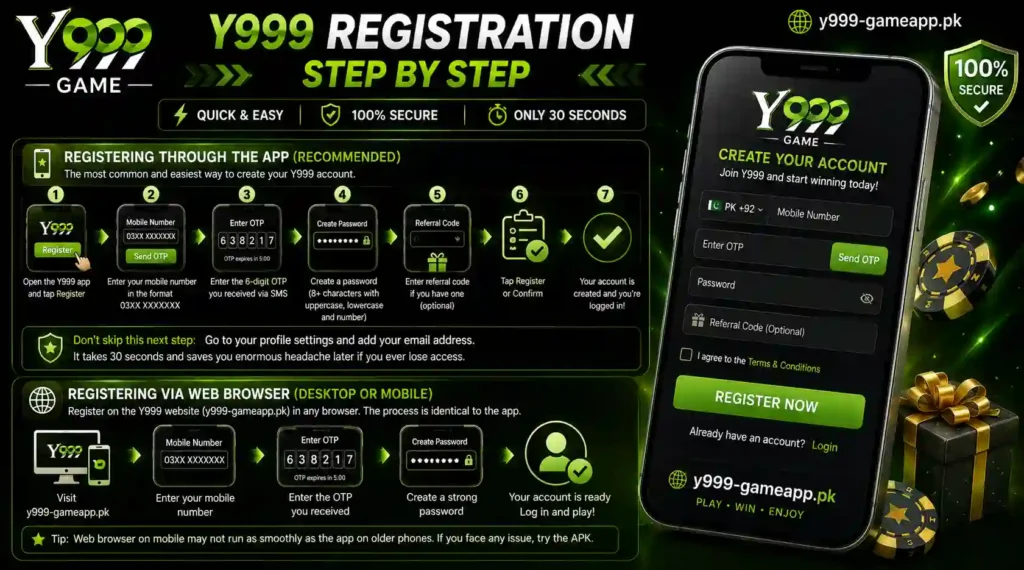
Y999 Registration: Step by Step
Registering Through the App (Recommended)
This is the most common path and the one most Pakistani players use.
- Open the Y999 app and tap Register
- Enter your mobile number in the format 03XX XXXXXXX, use the local format, not the international +92 version, unless the form specifically shows a country code selector
- Tap Send OTP. You’ll get a 6-digit SMS code within 30 to 90 seconds
- Type the OTP into the verification box. It expires in 5 minutes, if you’re slow, just request a new one
- Create a password: minimum 8 characters, must have at least one uppercase letter, one lowercase letter, and one number. Don’t reuse a password from another app
- If you have a referral or invite code, enter it in the field shown at this stage. If you don’t have one, leave it blank, it’s optional
- Tap Register or Confirm
That’s it. Your account is created and you’re logged in automatically. The lobby loads and you can see all the game categories.
Don’t skip this next step:
Go immediately to your profile settings and add your email address. It takes 30 seconds and saves you enormous headache later if you ever lose access.
Registering via Web Browser (Desktop or Mobile)
If you’re on a desktop PC or prefer not to install the app yet, you can register through the Y999 website (y999-gameapp.pk) in any browser.
The process is identical to the app, phone number, OTP, password, done. Your account is the same regardless of which path you used to create it. You can register via browser and then log into the app using the same credentials, or vice versa.
One thing to note: the web browser experience on mobile doesn’t always render as smoothly as the native app, especially on older phones. If you’re having trouble with the browser form, try the APK route instead.
Do You Need a Referral Code to Register?
Short answer: no. A referral code is completely optional.
But here’s what it actually is, because this confuses a lot of people. Y999 has a built-in referral system where existing players can share an invite code. When someone uses that code during registration, the person who shared it earns a commission or bonus once the new player deposits. The new player may also get a small welcome benefit depending on the current promotion.
If a friend sent you a code, enter it in the referral field during registration, it costs you nothing and may get you both a bonus. If you don’t have one, just leave the field blank and register normally. The platform is not going to block your account or reduce your access because you skipped the referral field.
One warning: if someone is trying to sell you a referral code or telling you that you can’t register without one, that’s not true, and they’re either misinformed or trying to scam you. Referral codes don’t have a monetary value, they’re just tracking links that benefit the person who referred you.
What Actually Happens After You Register
Most guides stop at registration. But for most people, the real questions start the moment they’re logged in. Here’s what comes next.
Your Welcome Bonus
Y999 typically runs a download app bonus for new registrations (around Rs100 equivalent) and a friend referral bonus (Rs600 per referred friend who deposits). These promotions change, so the first thing to do after logging in is tap the Promotions or Discount section in the app menu. This shows you what’s currently active and how to claim it.
Don’t deposit before checking the promotions tab. Some bonuses require you to activate them before your first deposit, once you deposit without activating, you may not be able to claim the offer retroactively.
Making Your First Deposit
Navigate to Profile → Recharge (or Deposit). You’ll see the payment options available for Pakistan:
- JazzCash: Mobile wallet. Most Y999 players in Pakistan use this. Instant transfer.
- Easypaisa: Mobile wallet. Equally fast, very widely available. Instant transfer.
- SadaPay: Digital bank account. Instant.
- Raast: SBP’s inter-bank instant payment system. Works from any bank account. Takes 1 to 15 minutes.
The minimum deposit is typically low to make onboarding easy, check the cashier screen for the current minimum, as it can change.
First deposit advice:
Screenshot your transaction receipt from JazzCash or Easypaisa before closing the app. If your balance doesn’t appear within 5 to 10 minutes, you’ll need that screenshot as proof when contacting support.
The Game Lobby
After registering and depositing, here’s what’s waiting for you:
- Slots: JILI Games (Fortune Gems, Super Ace, Money Coming), PG Soft titles, Crazy777
- Crash Games: Aviator, the most popular game on the platform in Pakistan
- Live Casino: Live Baccarat, Roulette, Dragon Tiger, Teen Patti
- Sportsbook: Cricket (PSL, international), football, and other sports markets
If you want to explore before depositing, some games have a trial/demo mode, look for a “Try” or “Demo” button on the game card. This lets you see how the game works without spending money.
KYC Verification: The Part Nobody Tells You About
Here’s something every new player needs to know, and almost no guide mentions it upfront: you can register and play freely, but you cannot withdraw your winnings until you complete KYC verification.
KYC stands for Know Your Customer. It’s an identity verification process, standard across all legitimate gaming platforms globally. Y999 requires it before processing your first withdrawal.
What you’ll need to submit:
- A photo of your CNIC (front and back)
- Possibly a selfie or live photo for face verification
Where to do it:
Profile → Verification (or Security) section in the app.
How long it takes:
Usually 24 to 72 hours. The platform reviews your documents manually.
Why it matters to you:
If you win and want to withdraw, you’ll hit a wall if KYC isn’t done. Starting it early, even before you need it, means you won’t be stuck waiting when you actually want your money out. Completing KYC also increases your withdrawal limits.
This isn’t a Y999-specific thing. Every legitimate platform in this space does the same. If a platform is promising withdrawals with zero identity verification, that’s actually the suspicious one.
Y999 Registration Troubleshooting
This is where this guide earns its keep. Let’s go through every real error that players hit, with actual fixes.
OTP Not Arriving
This is the most common registration problem and it has several different causes:
| Situation | What’s Happening | Fix |
| OTP hasn’t come after 2 minutes | SMS gateway delay | Tap “Resend OTP” and wait another 90 seconds |
| OTP never comes (Telenor users) | Some Telenor numbers have spam SMS filters | Go to your messaging app → Settings → disable spam filter temporarily |
| OTP never comes (any network) | SIM can’t receive SMS | Ask someone to send you a regular text to test. If that also fails, use a different SIM |
| OTP arrives but is wrong / rejected | Code expired | Request a new OTP, don’t reuse old codes. Each one expires after 5 minutes |
| OTP comes to the wrong phone | You entered the wrong number | Close the form, re-enter your correct number, request a new OTP |
One less obvious tip: if you’re on WiFi and OTP isn’t coming, switch to mobile data. Some router-level ISP settings can interfere with certain SMS delivery services.
“This Number Is Already Registered”
This just means you already have an account. You might have created one and forgotten about it, or someone registered an account with your number previously (which can happen if you got a recycled SIM from your carrier).
- If you forgot your password: Use the Forgot Password option on the login screen. It will send an OTP to your number to reset access.
- If the account isn’t yours (recycled SIM scenario): Contact Y999 support via live chat and explain the situation. Provide your SIM purchase details and they can help sort it out.
Do not create a second account. Y999’s system ties accounts to phone numbers and detects duplicate registrations. Both accounts can end up blocked.
Registration Form Won’t Submit / App Freezes
- Check your internet connection, switch between WiFi and mobile data to test
- Close the app completely (swipe it away from recent apps), then reopen
- If using a browser: clear your browser cache (Settings → Privacy → Clear Cache) and try again
- Try a different browser, Chrome tends to work most reliably with Y999’s web form
- If the issue persists in the app, uninstall and reinstall the APK
“Service Not Available in Your Region”
This geo-restriction message usually means your IP address is being filtered. Try:
- Switch from WiFi to mobile data (your home ISP might be blocking the domain)
- If you’re on mobile data and still seeing it, contact Y999 support, they can clarify whether your area is supported
This error can also appear if you’re using a VPN, some VPN exit nodes are blocked by the platform. Try turning off your VPN if you have one running.
Password Rejected at Registration
Y999’s password rules are: minimum 8 characters, at least one uppercase letter, at least one lowercase letter, at least one number. A password like Ahmed1234 technically passes (though it’s not a good password). Something like ahmed123 fails because it has no uppercase.
If your password keeps being rejected even when it seems to meet requirements, check that you’re not accidentally including a space at the end, some phone keyboards add a space after autocomplete.
Account Security: What to Do Right After Registering
Creating the account is step one. Protecting it takes two more minutes and is absolutely worth it.
Set a unique password:
Don’t use the same password you use for your email or bank app. If Y999 is ever compromised, you don’t want attackers getting into your other accounts.
Add your email immediately:
Go to Profile → Security or Account Settings and add a recovery email. Verify it by clicking the link sent to your inbox.
Enable 2FA if available:
Two-factor authentication adds a second verification step when logging in. Check the Security settings section, if 2FA is available, turn it on. SMS-based 2FA is fine, an authenticator app is even better.
Log out on shared devices:
If you ever access Y999 on someone else’s phone or a shared computer, log out when you’re done. The app stays logged in by default.
Never share your credentials:
Y999 support will never ask for your password. If anyone claiming to be support asks for it, that’s a scam.
Y999 on iPhone: What Are Your Options?
The Y999 APK is Android-only, which leaves iOS users without a native app. But you’re not locked out entirely.
The best option for iPhone users is the mobile browser version. Open Safari or Chrome on your iPhone, go to y999-gameapp.pk, and register/login there. The website is mobile-responsive and most game functionality works in-browser, though the experience is slightly less smooth than the Android app for things like loading speed and certain animations.
Some iOS users report that adding the Y999 website to their Home Screen (via Safari’s Share → Add to Home Screen) creates an app-like shortcut that makes it easier to access without opening a browser each time. It’s not a proper app, but it works well enough for day-to-day play.
There is no Y999 app on the Apple App Store as of this writing. If you see an “official” Y999 app on the App Store, verify it carefully, it may be an unrelated app using a similar name.
Frequently Asked Questions
Is Y999 registration free?
Yes. Creating an account costs nothing. You only spend money if you choose to deposit, there’s no registration fee, no maintenance charge, and no hidden cost to sign up.
Can I register without a Pakistani phone number?
Y999’s registration requires phone number OTP verification. If you have a non-Pakistani number, it may or may not work, the platform is primarily set up for Pakistani numbers. International users should test, but results aren’t guaranteed.
Can I have two Y999 accounts?
No. One phone number means one account. Creating multiple accounts violates the platform’s terms and can get all related accounts suspended, including any balances in them.
How long does Y999 registration take?
The registration form takes under 3 minutes. Account activation is instant after OTP verification. KYC for withdrawals is a separate process and takes 24 to 72 hours.
I lost my SIM, can I still recover my account?
If you added an email during registration, use the email-based password recovery. If you didn’t, contact Y999 support via live chat and provide your account username plus any deposit or transaction history as proof of ownership.
What is the minimum deposit after registering?
This changes with promotions. Check the Recharge/Deposit screen in the app when you’re ready, the current minimum will be displayed there.
Is there a demo mode to try games before depositing?
Yes. Many games on Y999 have a trial or demo mode accessible without depositing. Look for a “Try” button on individual game cards in the lobby.
What happens if I enter wrong information during registration?
Minor details like email can be updated in your profile settings after registration. However, your phone number and name need to match your payment details for KYC later, if these are wrong, contact support before making a deposit to get them corrected cleanly.
Final Thoughts
Y999 registration is genuinely quick once you know what you’re doing, the confusion mostly comes from the fragmented ecosystem of sites, not from the platform itself. Start by making sure you’re on the correct domain, have your SIM ready, and know that the registration form is just phone number + OTP + password. Everything else, first deposit, KYC, bonus claims, follows in the minutes after that.
If you hit a problem, the troubleshooting section above covers every common scenario. For anything it doesn’t cover, Y999’s live chat support is available 24/7 and is the fastest way to get account-specific help.